1. Manual meal management: a cost and operations ‘blind spot’
If the entire process depends on people consolidating data manually, a small error at the input can cascade into errors at every step that follows.
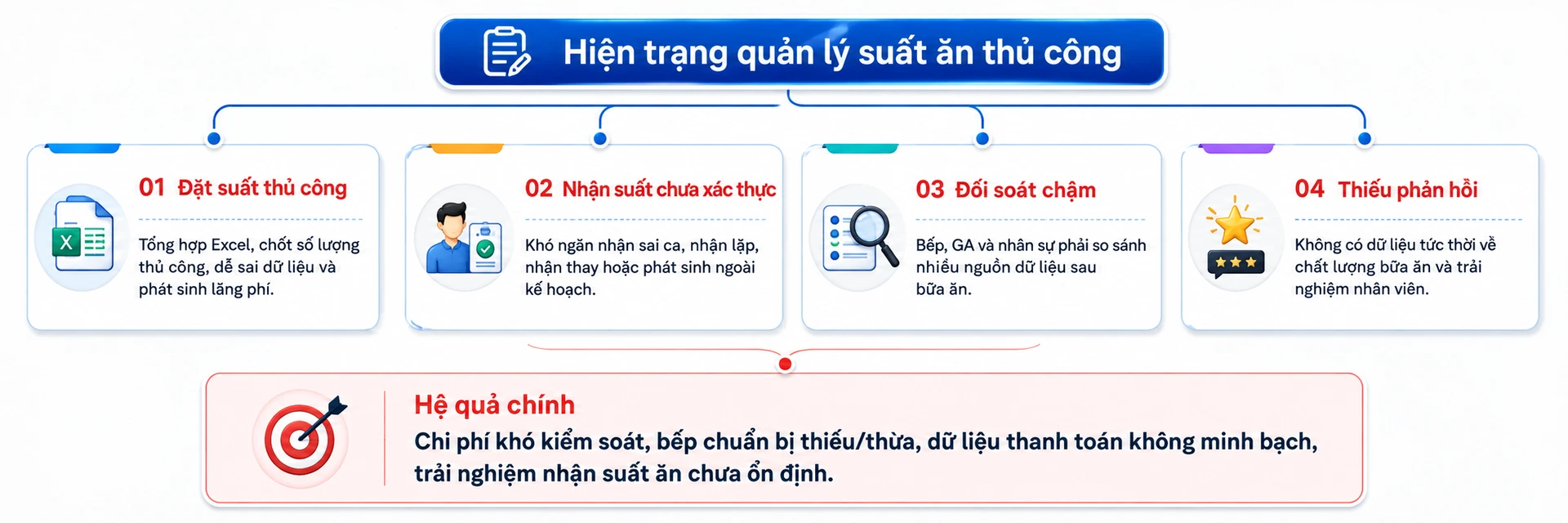
Common problems
- Manual meal ordering: Excel consolidation and manual headcount confirmation, prone to data errors and waste.
- Unverified meal collection: hard to prevent wrong-shift, duplicate, proxy or unplanned meal collection.
- Slow reconciliation: the kitchen, GA and HR have to compare multiple data sources after each meal.
- No real-time data: hard to monitor operational quality and the meal collection experience during the shift.
What does a day of manual operation usually look like?
- HR or GA exports the attendance data.
- HR filters who is at work, assigns shifts, handles special cases and consolidates everything in Excel.
- The list is sent to the kitchen or caterer to prepare the meals.
- At mealtime, employees collect meals with paper tickets, by signing a list, by reading out their employee ID or through manual checks.
- After the meal, GA and the kitchen reconcile meals ordered – meals prepared – meals actually served – extras – cancellations.
2. Case study: digitalizing the management of 1,500 meals a day
Imagine a factory serving 1,500 meals a day, with multiple production shifts and meal breaks concentrated in peak time slots.
- A 1% discrepancy equals about 15 meals a day.
- A 2% discrepancy equals about 30 meals a day.
- Operating 26 days a month, a 2% discrepancy equals about 780 meals a month that need to be explained or reconciled.
sd
2.1. One data source across the entire operation
Overall data flow
- HR/time attendance: provides employee data, shifts, clock-in times and related information.
- AI Canteen system: loads the data, checks for duplicates/gaps, identifies eligible employees and automatically creates the meal list.
- GA/Admin: monitors, reviews and handles exceptions when needed.
- Kitchen/vendor: receives the confirmed quantities, prepares the portions and tracks serving status.
- Kiosk/serving point: verifies via Face ID or QR, checking the right person – right shift – right meal.
- Dashboard/reports: real-time data for management and reconciliation.
2.2 Meals created automatically from attendance data
- Data sources: attendance, shifts, departments, employee IDs.
- Processing: loads data on a schedule, checks for duplicates/gaps and identifies eligible employees.
- Meal list creation: by day, shift, meal, dish and collection point.
- Data lock: confirms quantities for the kitchen to prepare.
- A big difference is that GA no longer has to create an “Excel copy” of HR data every day. Data flows all the way from the source to the kitchen.
2.3 Two layers of control: the kiosk and the serving point
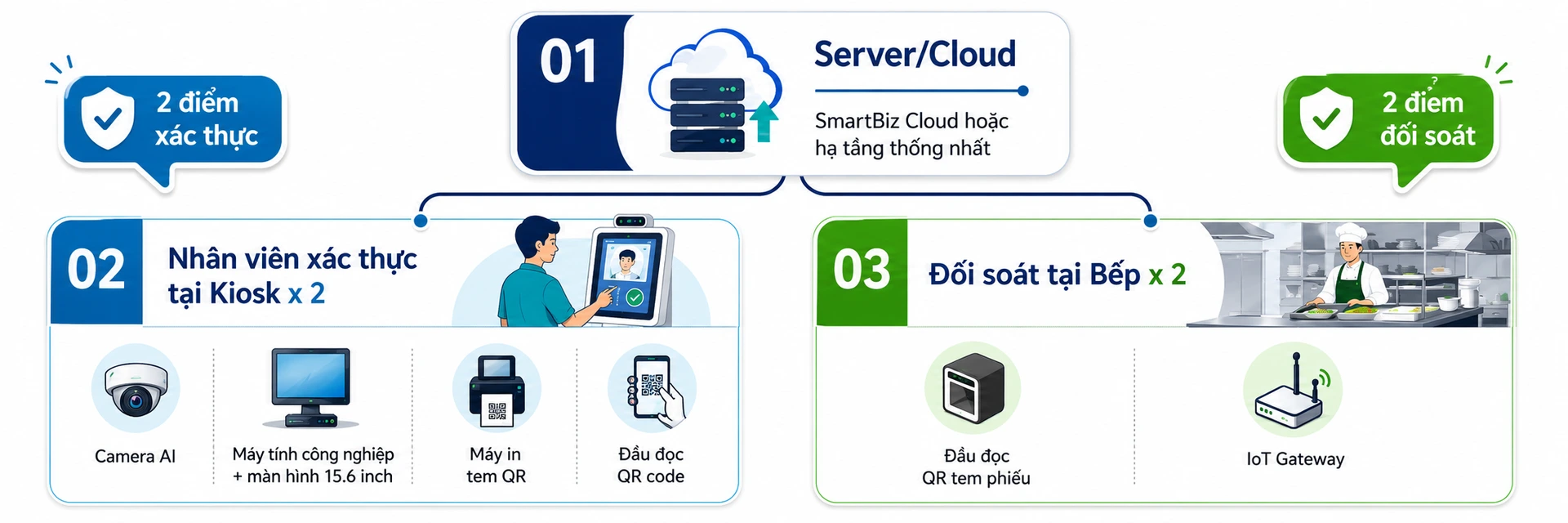 Fast recognition, 2-layer control
The hard problem for a factory canteen is not just knowing who is entitled to eat, but verifying hundreds or thousands of people in a very short time. The solution designs the verification area to be fast and clear, with less manual work.
- Employees verify with Face ID or QR at the kiosk (< 3 seconds)
- The system checks whether the person is on the eligible list.
- It checks the right shift, the right meal and the right collection point.
- It checks whether a meal has already been collected to prevent duplicates.
- The result is returned instantly so the employee can collect the meal or the exception can be handled
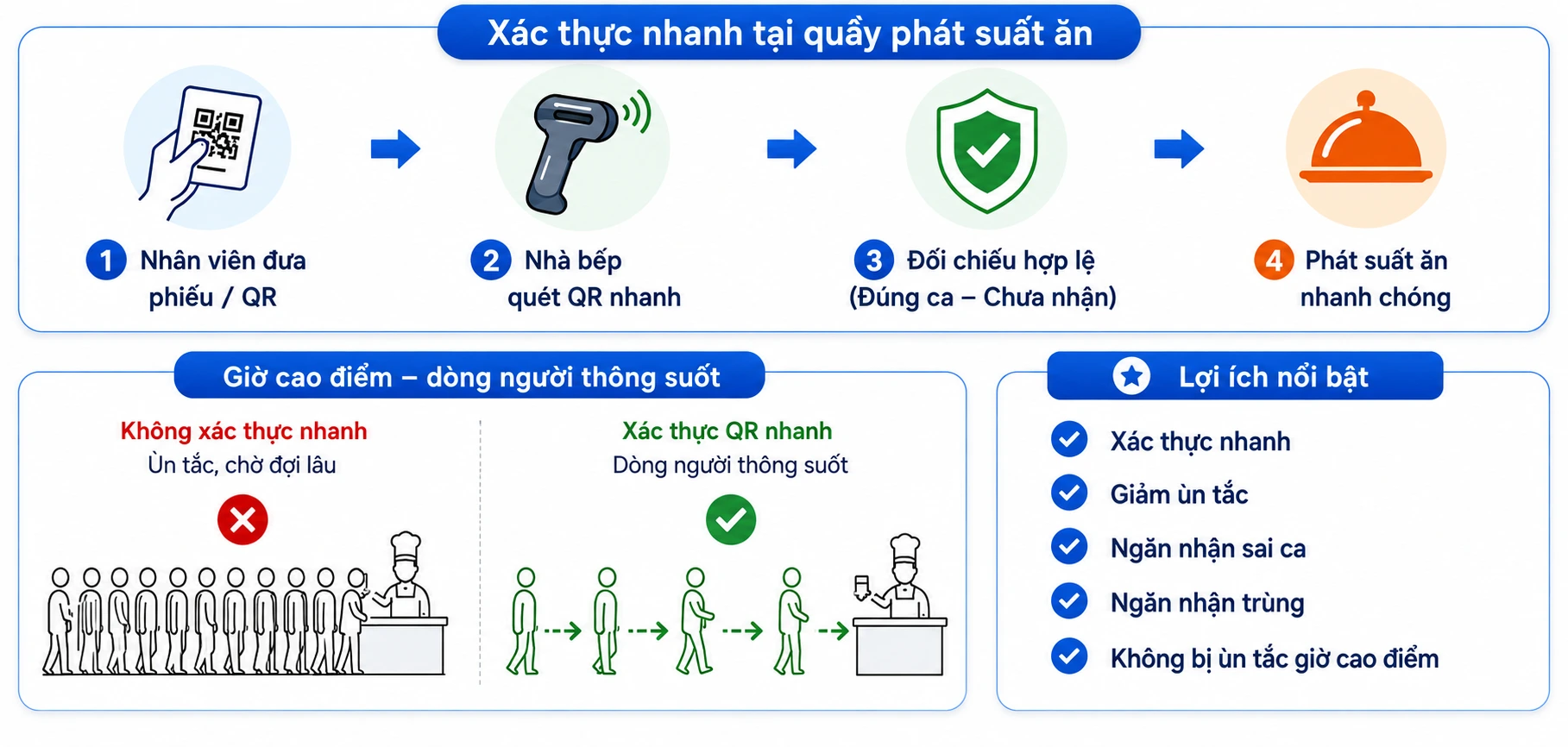
Meal tickets printed by the system enable fast verification and avoid congestion at peak times
The system therefore controls two different things: (1) whether the person is entitled to a meal; and (2) whether the meal was actually served. This is an important basis for making payment data with the kitchen or vendor more transparent.
2.4 The kitchen knows exactly how many meals to prepare before mealtime
- Meals to prepare by shift/dish.
- Meals being prepared.
- Meals served.
- Invalid attempts.
- The difference between meals created and meals actually collected.
For a kitchen serving 1,500 meals a day, this change moves it from “estimating and waiting for GA to confirm” to “preparing based on data confirmed by the system”.
2.5 Exceptions controlled the moment they occur
- Employee not on the list.
- No valid attendance data.
- Wrong shift or wrong meal.
- Meal already collected.
- Collection at a point that is not configured.
Every exception is logged so GA can review and handle it after the shift. When there is a complaint, the factory no longer relies on the counter staff's memory but can trace the transaction history in the system.
3. Before and after digitalization: the difference is in how you operate
BEFORE DIGITALIZATION |
AFTER IMPLEMENTING AI CANTEEN |
|
HR/GA export and consolidate data in Excel |
HR/attendance data integrated automatically |
|
HR calculates meal counts manually |
The system automatically determines the eligible list |
|
Quantities confirmed by phone/email/Excel |
Quantities confirmed centrally in the system |
|
The kitchen struggles to know which figures are the latest |
The kitchen tracks quantities by shift/dish |
|
Recipients checked against lists or manually |
Face ID/QR verification at the kiosk |
|
Hard to stop people collecting twice |
The system checks whether a meal was already collected |
|
Hard to control wrong shifts/wrong meals |
Checked against shift and time |
|
Tickets or lists are hard to trace |
QR transactions/status are logged |
|
End-of-day reconciliation from multiple sources |
Data updated in real time |
|
Hard to trace past incidents |
Every transaction and exception is logged |
|
Managers get reports after things have already happened |
Dashboard cho phép theo dõi ngay trong ca |
4. The real value is not in the kiosk
5. Conclusion
The AI Canteen solution – Right person. Right shift. Right meal. The right data at the moment it happens.
If your factory is still consolidating Excel, confirming meals manually, handling paper tickets and spending a lot of time on reconciliation, now is the time to consider digitalizing the process.
SmartBiz can demo the solution live on your factory's actual data and processes, from time attendance and meal creation to Face ID/QR verification and real-time reconciliation.
On-site survey → live demo → proven results → fast rollout, while making the most of your existing systems.