We have seen a large volume of requests for ERP implementation assessments and project recoveries recently. Despite vendors using accelerators and ERP software best practices, ERP implementations are becoming increasingly difficult.
The reasons include the complexity of system capabilities as well as the number of integrations needed. Unfortunately, most ERP implementation plans have not kept up with the times and are still geared toward on-premise technology deployments and simple data structures.
Implementation best practices developed over decades still hold their value, but the priorities that matter most for a successful digital transformation are changing.
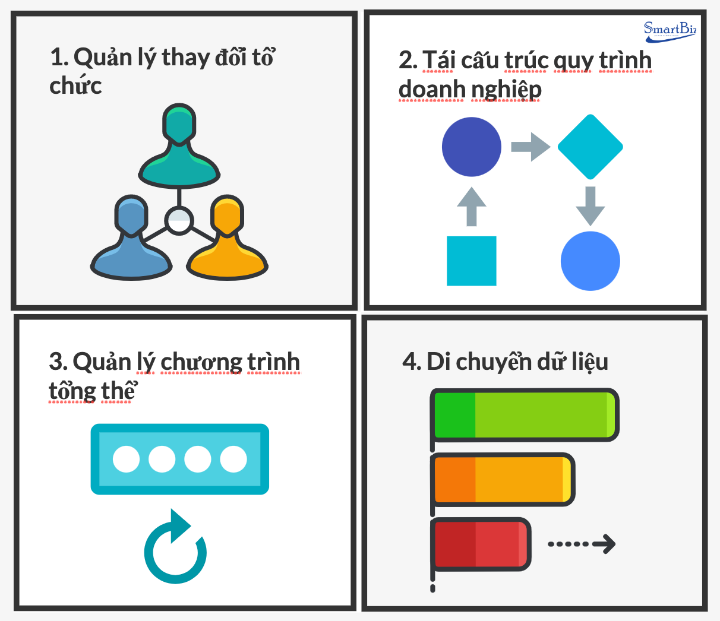
Here are the 4 key pillars you must have when implementing enterprise technology, and how large businesses implement ERP successfully. Without any one of these, your project is likely to fail.
Contents
The 4 pillars of ERP implementation
1. Organizational Change Management (OCM)
2. Transforming business processes
Successful ERP implementation methods that reduce risk and cost
1. Where should you start your ERP project?
2. What is the biggest success factor? Your project team
3. An effective ERP implementation process
4. 5 tips to minimize ERP implementation risk
5. Tips to avoid extra ERP implementation costs
Conclusion
The 4 pillars of ERP implementation
1. Organizational Change Management (OCM)
If you're tired of hearing about the need for OCM… good! Although every consulting firm on the planet has been talking and writing about the importance of OCM for more than a decade, organizations and most ERP consultants still fail to manage the change aspect properly. Any ERP or digital transformation will require people to change, and while people may want to change and may agree to change, they won't change without help. That is human nature and cannot be ignored.
Change management increases the success of important projects and initiatives. Moreover, businesses improve their ability to adapt quickly as they manage change.
The 8-step process for managing change according to Kotter's model:
§ Create a sense of urgency for change;
§ Build a powerful coalition to support and drive the change;
§ Form a vision and strategy;
§ Communicate the vision;
§ Remove obstacles and barriers;
§ Create short-term wins;
§ Build on and analyze the changes;
§ Anchor the changes in the corporate culture.
2. Business process re-engineering
If you don't standardize and document your processes, there is no way to program the future state into your system. If your plan is to use “out-of-the-box” best practices and let the software drive your business, think again.
This is especially true with best-of-breed ERP or multiple systems that offer too many operational capabilities. Even with a single ERP, this simply won't work. Today there is too much flexibility embedded in systems, too much complexity in integrated business processes and too much riding on your company maintaining its competitive advantages. Use what you can out of the box, but you won't know what other functionality will work until you define YOUR business needs.
When building your ERP implementation plan, start by laying a foundation in these four areas. From there, it will be easier to adjust your approach because you will be starting from a concrete blueprint.
§ Key users need to set up a process team.
§ The process team needs to list all business processes and how they are currently executed.
§ The process team needs to design revised workflows to carry out all business processes
§ Processes need to be reviewed by multiple stakeholders and approved by the CFO/CEO.
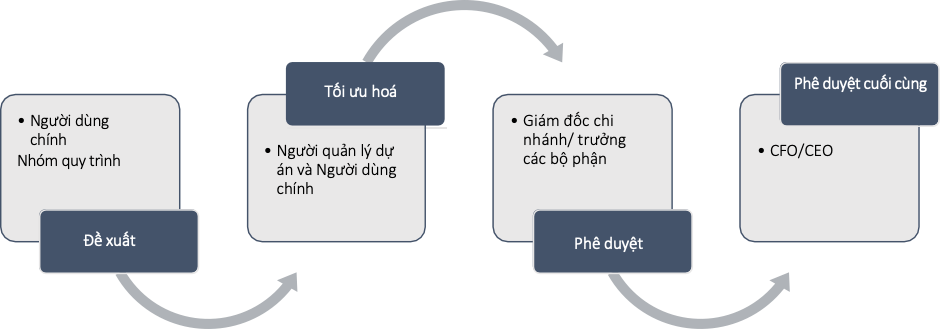
The process approval workflow
The following master data needs to be prepared along with the processes:
§ Employee list
§ Customer codes and customer list (if proposed in the process)
§ Supplier codes and supplier list (if proposed in the process)
§ Asset list
§ Product list - material codes
§ Accounting master data - general ledger (if changes are proposed in the process)
3. Overall program management
To be clear, we are not talking about “project management”. You still need internal and external ERP project managers to manage the technology and business implementation themselves, but you need an overall program manager to make sure all the moving parts fit together at the end.
You will have different vendors managing the technology and the business side, but the program manager will ensure that integrations are tested, that the overall data flow is stable and secure, and that conflicts between people, processes or technology are minimized. Ultimately, the program manager is responsible for ensuring the project's success.
The skill set needed for this goes beyond basic project management and should include a technology background as well as an appreciation of change management, for example:
Customizing and configuring modules during the ERP implementation must be done in sequence, and each module will have its own implementation cycle. The process documentation needs to capture every aspect of the configuration and development requirements (if any).
The ERP software customization and configuration phase
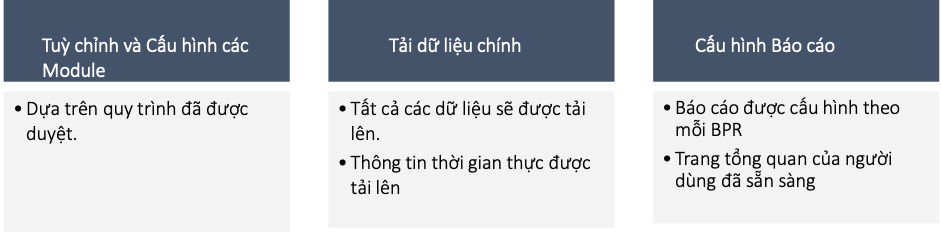
Testing

Go-live

Khám phá ngay: The best business management methods in the digital transformation era
4. Legacy data migration
Years ago, data was easy enough to manage. You just had to decide how much historical data to extract, clean and transfer. Today it is far more complex, with multiple data flows, the complexity of standardizing across systems, determining where data lives and the security required. And as for ongoing data management, the days when we measured data in GB are long gone.
Data migration can be carried out in the following steps:

Successful ERP implementation methods that reduce risk and cost
Implementing a new ERP system is a great opportunity for digital transformation. Not only can you move beyond the limited functionality or outdated technology of your old system, you can also take advantage of the capabilities of a modern ERP system to help you seize new business opportunities.

How to implement ERP successfully
However, not every implementation goes smoothly. So how do you set your company up for a successful ERP implementation? How do you avoid unnecessary costs and risks?
Here are a few statistics to help you understand the challenge you face:
60% of outsourced ERP implementations fail
80% of customers are dissatisfied with their implementation
57% take longer than expected
54% go over budget
Source – ERPFocus
These ERP implementation best practices can help you avoid common pitfalls and realize the benefits of your new ERP system faster.
1. Where should you start your ERP project?
When people think about implementing an ERP system, they usually start by looking at the features they want. But new features or technology are not the core issue; what a business needs to grow is modern business processes. Only with efficient processes that make you agile and responsive can you improve your competitiveness and serve customers better.
Current processes are often inflexible and fail to meet the company's needs. Even proven, cost-effective processes often need to be updated to meet evolving needs or enhanced with new capabilities, such as mobile access, alerts and business intelligence. So it is important to always keep those processes at the core of your implementation plan.2. What is the biggest success factor? The project implementation team
ERP implementation case studies all tell the same story: the make-or-break factor is the implementation team. Great software is only great if it is implemented by a strong team. If people lack the time, support or skills to do the work effectively, they won't succeed - and the project is likely to suffer delays, extra costs and/or software that doesn't meet the company's needs
Companies that have experienced ERP setbacks or failures often assigned employees who “had time” to work on the project. But to succeed, you need to recruit the people “you can't do without”. These are busy people who know the business processes, work well with other members of the organization and have the respect of executive management. Dedicate these people full-time to the project (40 hours available) or as many hours a week as possible.
Don't add anyone to the core project team who can't dedicate at least 25% of their time (a minimum of 10 hours) to the project each week. Team members who spend less than a quarter of their time will only be able to keep up with project activities but won't add value to the project.
Executive support for your team is also crucial. In every major implementation, decisions must be made about priorities and resource trade-offs. Without strong support and commitment, even capable teams can struggle.
Implementing a modern ERP system quickly is one of the most important things a company can achieve. You should dedicate your best people and lay the foundation for success.
3. A successful ERP implementation process
Any effective ERP implementation plan needs a roadmap. There is rarely a “perfect” ERP implementation plan and process, but careful planning and understanding the implementation steps will increase your chances of a successful implementation that fits your budget and timeline.
Set a realistic implementation schedule. Consider the availability of your leadership team, managers and internal experts who contribute to this effort. That said, the following key activities are common steps in every successful implementation:
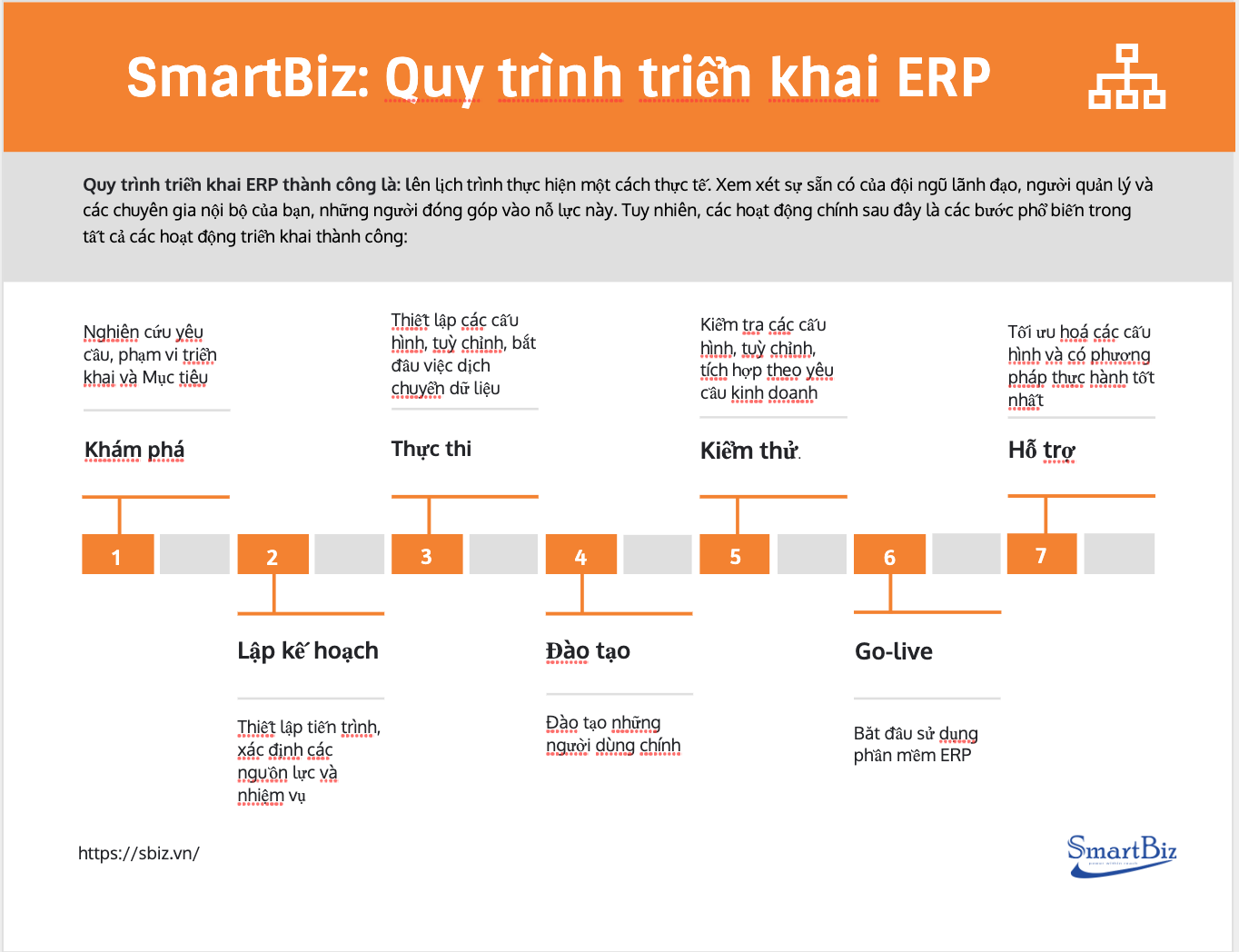 The ERP implementation process
 #1: Khám phá
Discovery is the research part of the project. In this step, all the important questions are asked and answered, such as:
§ High-level goals are defined
§ Project scope is defined
§ Potential integration systems are identified
§ Migration systems are identified
§ FIT-GAP analysis is carried out and customization options are discussed
§ The business process questionnaire (BPQ) is completed by the process team
§ Business requirements and processes are discussed
Pro tip: A thorough BPQ is the key to a successful discovery. The process team should do its best to provide good detail so the transition can go smoothly.
#2: Planning
Planning sets the timeline and defines key resources and responsibilities for internal and external teams.
§ Key team members and responsibilities are established (project manager, sponsor, executive, subject matter experts, developers, analysts, others as needed)
§ Key users (owner, CIO, others as needed)
§ The project implementation timeline is set; weekly or monthly reporting with meetings, work status and key milestones.
§ Processes - outlining how old processes will be transformed into new processes that fit the ERP software
Business Requirements Document
#3: Execution
This is where you start working hands-on with the ERP software
§ Migrate data from the previous system, if needed
§ Configure key processes such as “procure-to-pay” and “order-to-cash” and other business-specific processes outlined in the phase plan
§ Set up the chart of accounts and account balances
§ Configure ERP settings such as accounting, shipping, costing and security options
§ Configure ERP module settings based on the requirements established in previous phases
§ Build automations, integrations, workflows and customizations as required
§ Set up roles and permissions and more, depending on specific requirements
#4: Training
This is an often underestimated step that we have found to be a huge factor in the success of an implementation once external resources have left. If users aren't properly trained, how can they make the most of the application after the experts leave? Simply put, they can't. Proper training lets users hit the ground running and spot problems with ERP functionality earlier.
Training resources include:
§ Courses provided by the ERP implementer
§ Workshops and training materials set up specifically for users by the implementation partner
§ Guides and online tutorials
Pro tip: It's best to start training during the process execution phase and before the testing phase. That way users have more time to get familiar with the platform before they have to sign off that the implementation meets the requirements.
#5: Testing
Testing is another often-overlooked part of ERP implementation. Rigorous testing is needed to ensure the results match the agreed business requirements set out in the BRD. There may be several testing phases, depending on the business's needs.
Use-case testing - The development team and external parties make sure all processes and customizations set up in the execution phase work according to the requirements set out in the business requirements.
User acceptance testing - Users test the processes and customizations set up in the execution phase. This is why we recommend starting training before the testing phase begins. How can users verify the implementation team's work if they don't know how the ERP software works?
#6: Go-live
This is when you find out whether all that hard work and planning has paid off, as you start using the ERP software for real business purposes.
#7: Post-go-live support
Keep those external resources for the next few months, because problems you may have missed during testing and go-live may not appear immediately. In addition, getting the maximum ROI from the platform is an ongoing process and will require adjustments and upgrades in the years ahead.
5 tips to minimize ERP implementation risk
Every project carries some risk, but here are 5 valuable tips to improve your chances of completing the project on time and on budget.
#1: Choose software, business processes and implementation partners with industry and local knowledge. Always interview references in businesses like yours.
#2: Don't stretch outdated technology beyond its limits. Eliminate old, outdated, standalone systems and, as far as possible, consolidate your data into a single database (a single version of the truth) with built-in business intelligence for multi-sector and multi-country operations.
#3: In the digital economy, businesses often have to integrate systems across business units as well as with customers and suppliers. Confirm that you have cloud integration capabilities and expertise with supplier networks.
#4: Avoid project scope creep. New needs and opportunities during an ERP implementation are common, so it is important to manage changes to avoid delays and cost overruns.
#5: Confirm that you have consistent expertise across all your locations. You need training, implementation and support - usually from a combination of your internal management, software distributors, consulting firms and software partners.
Worth knowing: How to manage a smart, modern warehouse and optimize performance
5 tips to avoid extra ERP implementation costs
Investing in a new ERP system involves commitments of your company's time, business process and implementation consulting, software and cloud services, as well as computers, tablets and phones - so it is important to keep the project and its costs under control.
Here are some key areas to watch:
#1: Manage your total costs - and benefits over time - to minimize costs and maximize returns. Remember that implementing an ERP system will have a major impact on your business operations.
#2: Fit your business directives and don't force unnecessary process changes. In many cases, companies are pressured to change the way they operate to fit the software, which increases implementation and operating costs.
#3: Focus on the routine business processes that deliver significant value to the company. Managing customer orders, updating prices, adding new products and services, changing production details and onboarding new employees are examples of such routine processes.
#4: Avoid customizations and take advantage of configurable user interfaces, dashboards, alerts, workflows, business intelligence and mobile capabilities. With these capabilities, you can streamline work for all your departments and make quick, cost-effective adjustments when needed.
#5: System hacks and data breaches are costly. When using the Internet, use a secure cloud ERP solution where appropriate - confirm that your software and service providers support a range of secure software deployment options.
Conclusion
Digital transformation offers further opportunities to work with customers and suppliers to redefine how business is done in your industry. These projects often include new technologies such as machine learning and artificial intelligence (AI), as well as integration with equipment and vehicles using Internet of Things (IoT) technology to improve speed and efficiency.
Every ERP project will have unexpected issues. However, by following best practices for successful ERP implementation, you can identify and resolve them as they arise and manage your risks and costs effectively.