WMS implementations rarely fail because of “bad software”, but usually because of 7 classic traps: designs that don't follow the flow, dirty data, choosing the wrong picking/packing model, no peak-season scenarios, no load testing, neglected change management, and KPIs not locked in from the start.
If your WMS implementation is 20–30% over budget, go-live keeps slipping and performance… falls short of expectations — you are very likely making several of the 7 mistakes below. The good news is that most of them can be prevented early with the right checklist and a “data-first, flow-first” approach.
Contents
Why WMS projects easily “go over budget”?
Mistake #1: Designing the warehouse layout and location logic without regard to “flow”
Mistake #2: Dirty master data (SKUs, UoMs, label codes) & failed standardization
Mistake #3: Choosing the wrong pick/pack model (discrete/batch/zone/wave/waveless)
Mistake #4: Ignoring peak scenarios & volume spikes (Black Friday, Tet, flash sales)
Mistake #5: No stress testing & no sandbox for error scenarios
Mistake #6: Neglecting “change management” (SOPs, training, KPIs & incentives)
A 90-day roadmap: from “data cleanup” to a “soft-landing go-live”
Why do WMS projects easily “go over budget”?
A WMS directly affects the flow of goods, people and equipment in the warehouse. Get just one “link” wrong — such as the location layout, labels or KPIs — and the result is congestion, errors, rework and lower productivity. Hidden costs usually come from:
- Extra staff for “firefighting” during the transition,
- Overtime due to blocked picking/packing flows,
- Reprinting labels and fixing master data,
- System downtime to “patch” the configuration.
Below are the 7 most common mistakes — and practical ways to fix them.
 Spot the 7 WMS implementation mistakes that inflate costs by 30% and a 90-day roadmap to fix them: flow-first, data-first, stress testing, OTIF KPIs, pick accuracy.
#1. Designing the warehouse layout and location logic without regard to “flow”
Signs: Racks laid out out of habit, bins named inconsistently, zig-zag travel paths; receiving and shipping “step on each other's toes”; forklift and picking teams cut across each other's flows.
Consequences: Excess travel, many crossings and congestion. Picking time increases by 15–25%; slotting/put-away planning errors cause fast-moving SKUs to get “stuck”.
Cách tránh:
- Design around the real flow (flow-first): map and simulate the entire flow: inbound → quality check (QA) → put-away → pick-face replenishment → picking → staging → shipping.
- Slot locations by SKU “velocity”: group SKUs into A/B/C by turnover and also by size/weight; put fast movers in the “golden zone” (easy to reach, close to aisles).
- Name racks/locations with clear rules: use a Zone—Aisle—Bay—Level—Position structure (Zone–Aisle–Bay–Level–Position) so that both people and scanners read it correctly.
Example: Z-A / A03 / B12 / L2 / P05. - Separate areas for special goods: create dedicated zones for returns, defective/irregular goods so they don't get mixed with compliant stock.
#2. Junk master data (SKUs, UoMs, label codes) & failed standardization
Signs: Duplicate SKUs, missing UoM conversions (case → each), “improvised” barcodes, old faded/damaged labels, no naming rules.
Consequences: Wrong scans/lost tracking, inventory discrepancies, operations teams “firefighting” in Excel. After go-live you have to stop to “clean up”.
Cách tránh:
- Prioritize data (data-first): immediately finalize the data scope needed for the first go-live day: SKUs, units of measure (UoM), barcode mapping, label printing rules.
- Consistent naming rules: standardize SKU/pack level names (e.g. case / inner / each) and apply GS1 standards where needed.
- Test labels on real devices: print labels and test-scan them with real scanners (at different angles/distances) before rolling out widely.
- Review & clean data (data profiling): find duplicates/missing data, standardize formats; create a Data Playbook spelling out the rules, examples and owners.
#3. Choosing the wrong picking/packing model (discrete/batch/zone/wave/waveless)
Signs: A single “traditional” picking method used for all orders. Facing flash sales/high-volume single orders → congestion.
Consequences: Labor costs balloon and error rates rise; picking lead times stretch out and OTIF becomes hard to achieve.
Cách tránh:
- Classify orders & items before picking:
- Single-item vs batch orders; few lines vs many lines → choose the right scenario.
- Choose the picking scenario for the situation:
- Batch picking: group many few-line orders to pick them all in one round → faster.
- Zone picking: divide the warehouse into zones; each person only works within their own zone → less travel.
- Wave / waveless: sequence orders by SLA/shipping priority; waves run in batches, while waveless flows continuously.
- Organize the packing area clearly:
- Design staging by “lane” (carrier/SLA/order type).
- Separate packing benches for each lane to avoid mixing orders and to increase speed.
#4. Ignoring peak-season scenarios & volume spikes
Signs: Things run fine on normal days, but on Black Friday/Tet/flash sales everything falls apart. There is no way to switch on/off a dedicated peak-season process.
Consequences: Order backlogs, overtime, customer complaints, and carrier penalties.
How to avoid it (from the start):
- Build a dedicated “peak scenario”:
- Flexibly switch/combine picking models to suit high loads.
- Prioritize A SKUs (fast movers) in easy-to-reach locations.
- Add temporary staging and seasonal staff.
- Temporary re-slotting for peak season.
- Build a capacity model:
- Calculate throughput per hour/shift and identify bottlenecks (areas, people, equipment).
- Run a “game day” drill:
- Run 1–2 simulations before peak season to
#5. No stress testing & no error drills (sandbox)
Signs: Only the “happy path” is tested, with no tests for bad labels, shortages, location changes, lost connectivity or batch changes.
Consequences: Small incidents stop the line because there is no playbook for handling them; the team gets exhausted and loses trust in the system.
Cách tránh:
- Stress test: simulate high loads with real/synthetic data (lines/orders, number of people scanning simultaneously).
- “Light” chaos testing: deliberately create faded labels, duplicate SKUs, a 5-minute network outage, missing bins… to rehearse the SOPs.
- Prepare a runbook: if A happens → do B; define who may authorize a temporary “bypass”.
#6. Neglecting “change management”
Signs: Operators push back and “bend” the process; new team members have no standard documentation; training is “word of mouth”.
Consequences: Non-standard operations, unreliable reports, difficulty expanding to other shifts/warehouses.
Cách tránh:
- Short role-based images/clips: separate clearly for inbound, picker, packer, QC, supervisor; each step has an illustration or a 30–60s video.
- Training by shift + hands-on checks: after training, practice – get scored; link to KPIs & rewards/penalties (e.g. pick accuracy, lines/hour).
- Appoint a “champion” for each shift: someone who knows the process well, on hand at the start of each shift/week, to answer questions and resolve issues quickly.
- Controlled change updates: every process/system change must have brief release notes and be announced to the shifts concerned.
#7. Not locking in standard KPIs from the start
Signs: Only looking at “inventory right/wrong” while ignoring key metrics such as OTIF (on time, in full), pick accuracy, dock-to-stock (from truck arrival at the dock until goods are ready to pick), lines per hour and cycle count accuracy.
Consequences: Gut-feel decisions and optimizing for the wrong goals; operators can't see the “finish line”.
Cách tránh:
- Lock in the KPI set from day one:
- On time, in full by sales channel.
- Pick accuracy by shift/area.
- Truck arrival time (minutes) for inbound.
- Hourly productivity
- Count accuracy
- Set targets at 30/60/90-day milestones and put up a KPI board in the work area so everyone can see progress every day.
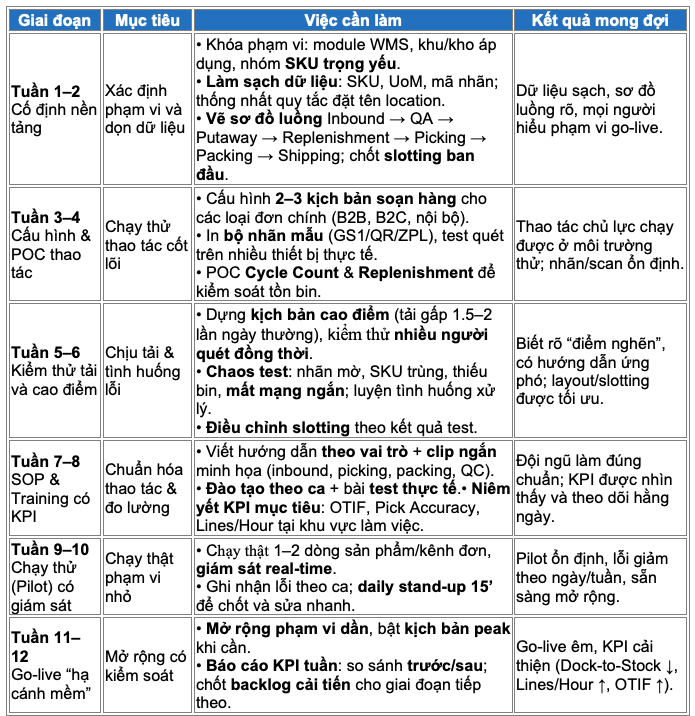
A 90-day roadmap: from “data cleanup” to a “soft landing”
Learn more: Alibaba's AI & drone warehouses - a warehouse management trend: can Vietnamese businesses keep up?
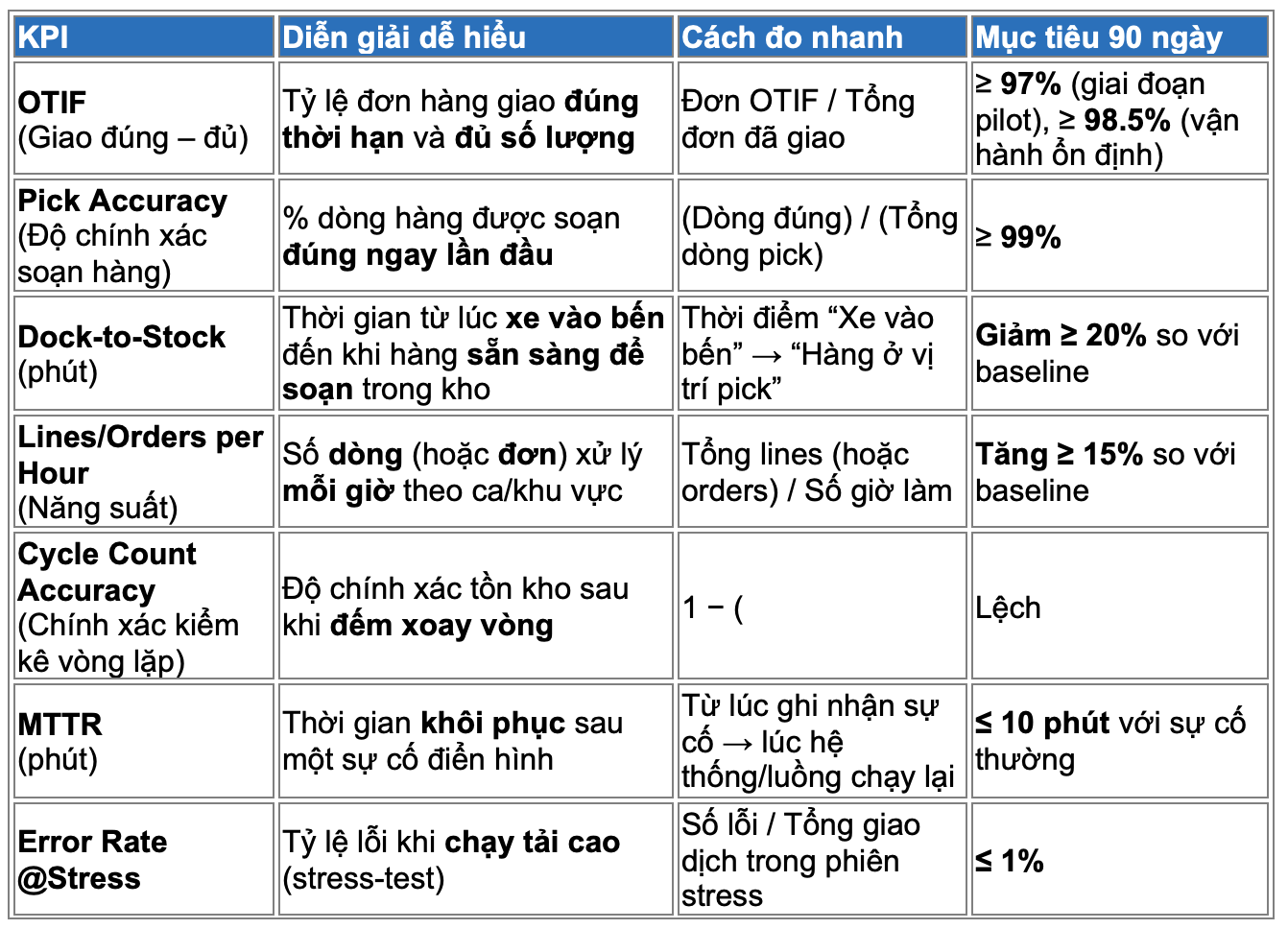
Standard KPIs to lock in (quick definitions)
Warehouse KPIs are a set of metrics that measure how correct – fast – accurate – stable the entire flow of goods is, from receiving (inbound) and storage/put-away – replenishment to picking – packing – shipping (outbound). They let operations teams and managers see where the bottlenecks are, how performance is trending and what the cost/customer impact is, so they can make improvement decisions daily/weekly.
- Performance & service group: OTIF, lines/orders per hour.
- Operational quality group: pick accuracy, cycle count accuracy.
- Process speed group: dock-to-stock, put-away time, replenishment SLA.
- System stability group: MTTR, error rate under stress.
Final thoughts
Seven common mistakes, from poorly designed flows and dirty data to a lack of load testing, are why WMS projects miss their targets. By switching to an approach that prioritizes operational flow + standard data (flow-first + data-first), locking in KPIs from the start and following a disciplined 12-week roadmap, a “soft landing” within 90 days is achievable. Typical results: dock-to-stock ↓ ≥20%, productivity per hour ↑ ≥15%, OTIF ≥98%. That is the real measure of an effective WMS project.
Contact SmartBiz for a free consultation and demo of a solution suited to your warehouse model and size.