Stock counting is an important part of business management, but it usually requires a lot of resources and can easily lead to errors. However, an effective way of counting inventory can bring significant savings - up to 50% of resources - while ensuring up to 99% accuracy. In this article, we explore a method for counting inventory effectively that helps businesses optimize the process, achieve maximum accuracy in inventory management and make counting simpler and more efficient than ever.
3 case studies of companies' stock counting problems
A supplier of elevators and spare parts
The company has many warehouses in many locations and regions. Each count takes many days or weeks, and warehouses are not counted on the same day. Currently, the actual stock at any single point in time cannot be determined.
They want warehouse management software that can lock in the quantities of all warehouses at one point in time, without tracking, recording or manually adding and subtracting receipts and issues to calculate stock, so they can handle receipt and issue transactions during the count or after the count before stock is adjusted.
A distributor of construction machinery: excavators and diggers
The company has 4 main warehouses in Hai Phong, Ha Tinh, Da Nang and Binh Duong, plus dealer warehouses. Each annual count takes 1~2 months depending on the size of each warehouse, and counting costs billions of VND, yet the figures still aren't guaranteed to be accurate because receipts and issues happen continuously and in large volumes. The counting process relies on stock cards to record these transactions by hand, so reconciling and consolidating data takes a long time and many errors occur.
A garment manufacturer
Before the physical count of the production materials warehouse, the materials warehouse team posts all the receipts/issues planned for the month on stock cards and in the software to lock in stock quantities. This is to avoid receipt or issue transactions occurring during the count.
A guide to counting inventory: save up to 50% of resources, 99% accuracy, in real time
Smart counting: save 50% of resources with up to 99% accuracy
A comprehensive solution to the typical cases above is a modern, smart warehouse management system using barcodes and QR codes that solves counting problems, ensures actual inventory data is updated simultaneously and accurately, and reduces counting costs and time for the business.
Overview
Use barcodes and QR codes to manage inventory:
Products and goods carry barcodes or QR codes so they can be tracked in each warehouse. This makes it possible to determine exactly how much stock each warehouse holds at a specific point in time. The data is updated automatically whenever receipt and issue transactions occur.
Use a central warehouse management system:
Make sure your warehouse management system is integrated with the warehouses at your different locations. The business can use a central warehouse management system to manage all inventory. Information from all warehouses is automatically consolidated and updated in the central system, so you know your total inventory at a single point in time. This ensures accuracy and reduces counting time.
Warehouse management software integrated with barcodes and QR codes updates inventory data in real time. Whenever goods are received or shipped, the system updates the data instantly, so you know the actual stock situation at any time.
Use mobile devices with warehouse management software:
Equip counting staff at each warehouse with mobile devices running warehouse management software integrated with barcodes and QR codes. During the count, staff can scan the barcodes or QR codes of goods and the information is sent directly to the central system.
Khám phá ngay: Use barcodes/QR codes and a warehouse layout for smart warehouse management
Schedule synchronized counts:
Make sure warehouses are scheduled for synchronized counts, at least within a short period. Counts on different days should be scheduled sensibly to ensure consistency and simultaneous updating of inventory data.
Define an optimal counting process:
Instead of posting all receipts/issues before the count, define an optimal counting process that doesn't disrupt production or deliveries. A smart warehouse management system lets you count by location, lot, product or day without having to post receipts/issues all at once.
Periodic and ad-hoc counts:
Use a periodic counting plan at each warehouse and add ad-hoc counts. This helps check the consistency of inventory data and identify discrepancies quickly.
System integration:
Use warehouse management software and barcodes/QR codes that integrate easily with other systems, such as an enterprise resource planning (ERP) system, to improve overall management.
Use automation technology and IoT:
Apply Internet of Things (IoT) technology to monitor inventory in real time. Sensors can track changes in stock and send information to the warehouse management system. This enables continuous inventory tracking without frequent counts.
Train and support staff:
Make sure counting staff at each warehouse are carefully trained on counting and on using the tools, software and processes. Technical support is also important to keep the counting process running smoothly.
Specifically:
For the 3 case studies above, a smart warehouse management system lets businesses count effectively, saving up to 50% of time, cost and resources, and provides inventory data with up to 99% accuracy.
Schedule synchronized counts:
Make sure warehouses are scheduled for synchronized counts, at least within a short period. Suppose the count schedule is as follows:
- Inventory data for all warehouses must be locked in as at: 31 December
- Counts can be carried out at all warehouses from 1 to 24 December; depending on the size of each warehouse and the counting resources, the schedule can be set to different dates.
- Explanation of inventory discrepancies (if any) and the plan for handling them: 25 to 30 December
- Unified inventory update/adjustment applied to all warehouses on: 31 December
The counting method with a smart warehouse management system
There is no need to record receipts and issues that occur during the count by hand or on stock cards. The system updates these transactions automatically and in real time. Inventory data is updated/adjusted at the same point in time for all of the business's warehouses.
First, your products and goods need barcodes or QR codes so product information and locations can be tracked in each warehouse.
Next, define the counting process: count by location, by lot or by product.
Use mobile devices with warehouse management software: equip counting staff at each warehouse with mobile devices running warehouse management software integrated with barcodes and QR codes. During the count, staff can scan the barcodes or QR codes of goods and the information is sent directly to the central system.
Now everything is ready!
At each warehouse, counting staff can choose to count by storage location, by lot or by product.
The counting staff go to the location to be counted and use a barcode/QR code scanner to scan the location code. The system automatically displays all the products stored at the scanned location, with quantity, location, lot number…
Scan the lot number, package code or product code to be counted at that location (depending on which code the business uses to manage products) and count the actual quantity.
Enter the actual quantity counted into the software on the barcode/QR code scanner (not yet confirmed or applied as an adjustment, since any discrepancy needs a handling plan or must be approved for adjustment by an authorized person).
Example: you need to count Warehouse 1 by location. The count starts on 15 December and is expected to end on 20 December. Say the book stock of product A on 15 December is 100 units, and the physical count on the same day is 95 units. That is a discrepancy of 5 units.
Enter the actual quantity of 95 units into the software without confirming the stock adjustment yet. All receipts and issues of this product (carried out with the barcode/QR code scanner) are recorded by the system, and the new stock is updated in real time based on the book quantity.
Example: you need to ship 20 units of product A to a customer on 16 December. You ship them using the barcode or QR code scanner, and once the 20 units have been shipped, the stock of product A in the system is updated to 80 units (100 on the books - 20 units shipped).
Then on 18 December you receive 30 units of product A. Once receipt is complete, the system updates the stock to 110 units (80 in stock on 16 December + 30 new units received on 18 December).
If you have further receipts and issues up to 30 December, the system automatically updates and calculates stock based on the book value.
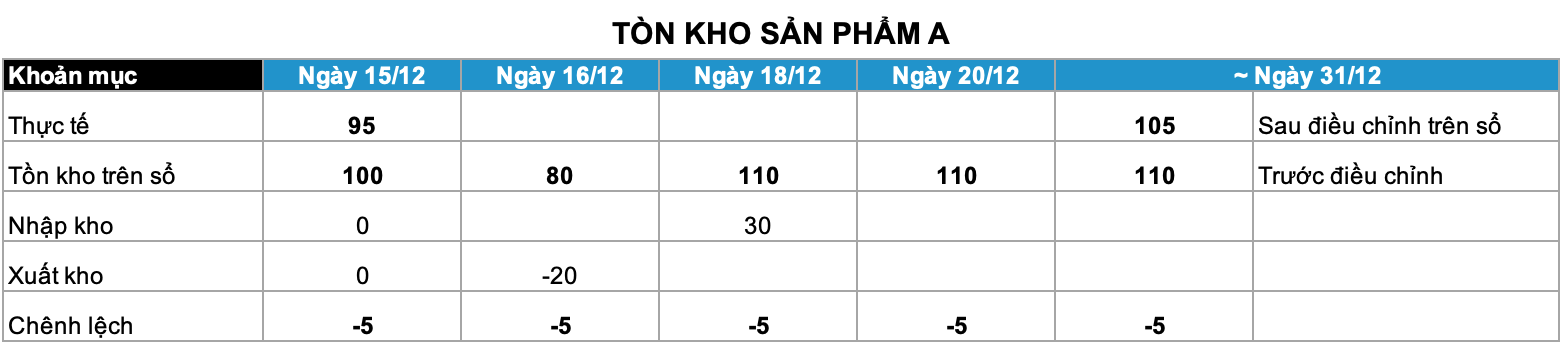
By 31 December, the cause of the 5-unit shortfall of product A has been identified - warehouse staff shipped them to a customer by mistake - and the stock must be adjusted according to the schedule for locking in the stock of all warehouses as at 31 December after the count.
An authorized person approves the inventory discrepancy and confirms the stock adjustment. At this point the system offers 2 ways of calculating stock for you to choose from:
o Use the ‘discrepancy’ of 5 units (i.e. adjust the stock at the current time (31 December) by the 5-unit ‘discrepancy’ that arose when the counted quantity of 95 units was entered), or
o Use the counted quantity (i.e. the 95 units of product A counted on 15 December).
In this case you would choose the first option: use the discrepancy, because receipts and issues of product A occurred during the count. When you choose it, the system gives you an adjusted stock on 31 December of 105 units (assuming no further transactions between 18 and 31 December, the system calculates stock as: 110 on the books as at 31 December – the 5-unit shortfall that arose when the physical count was entered)
The same applies to the other warehouses: on 31 December the stock adjustments are approved, and once the authorized person confirms the approval in the system, the inventory data of the remaining warehouses is updated automatically as at the same date, 31 December.
Learn more: Smart warehouse management lessons from 3 successful large corporations
With a smart warehouse management system, you can adjust stock at all warehouses at the same point in time without recording by hand on stock cards, eliminating the step of adding and subtracting receipts and issues during the count in tracking files outside the system, and without having to post the month's planned receipts and issues in advance.
Instead, smart warehouse management software provides a smart counting feature: by using barcode and QR code scanners for every receipt and issue, inventory data is updated continuously. This brings the business great benefits, reducing the time and resources needed for counting while providing accurate, real-time inventory data.
Conclusion
In this article, we have discussed effective inventory counting methods that help businesses save resources and ensure accuracy.
We have seen that using technologies such as barcodes and QR codes can update inventory data in real time and reduce errors. Setting up a periodic counting process and using a smart warehouse management system can make counting easier and save time.
Always remember that effective inventory management is key to keeping your business running smoothly and profitably. By applying the methods discussed in this article, you can improve your inventory management and contribute to your business's success.