Have you ever imagined how effective it would be if smart warehouse management software were integrated or linked seamlessly with the business software you already use?
This case study reveals the secrets and strategies businesses have used to take advantage of these systems. You will learn how they built a strong integrated process between smart warehouse management and other software. This integration created a powerful infrastructure that lets businesses optimize workflows, strengthen data consistency and reduce errors.
Don't let warehouse management problems hold back your growth and scalability. Explore these case studies to find the right solution for your business, one that meets today's requirements and lays the foundation for future growth.
Contents
[Case study #1] Smart warehouse management with Bravo software and production management
This is the case study of a leading brewery that uses Bravo software to manage its sales and accounting processes. However, like many other businesses, it faced an important challenge: barcode-based warehouse management. So it was looking for a smart warehouse management solution using barcodes to improve warehouse efficiency and control.
By applying barcode technology to warehouse management, the business can use automation to reduce errors, increase accuracy and improve productivity. It believes this solution will bring positive change and take the company one step further on its journey to success.
Let's explore this case to better understand the importance and potential of smart barcode-based warehouse management in manufacturing.
About the company
The branch of S** G** Beer JSC belongs to the S****O Beer – Alcohol – Beverage Corporation. S****O has a 145-year history and 43 years of building and developing its brand. Its S** G** and *** beers are still the leading Vietnamese brands in the Vietnamese beer market and are on their way to conquering demanding markets such as Germany, the US, Japan and the Netherlands.
Current state of warehouse management
The software systems used by the branch are: Bravo software for sales and accounting, and production management software for production and the warehouse. This software is applied uniformly across the whole corporation. However, the current production management software does not support barcode-based warehouse management and has many shortcomings.
The branch divides warehouse management into 4 large warehouses: spare parts and supplies, chemicals, packaging and finished goods.
Warehouse operations for receiving/issuing/transferring goods are currently done manually at the branch, and warehouse activities are recorded in Excel.
Receipt and issue data is entered into Excel files and then pushed to Bravo to record receipts and issues and create codes.
The branch's goods and supplies are mainly spare parts, machinery and equipment and office supplies for production, currently about 2,000 product codes.
Goods in the warehouse are not yet managed with barcodes.
Receiving and issuing currently take a lot of time creating codes and entering data across different software (Excel files, Bravo, production management software)
Goods in the warehouse do not have recorded storage locations, so picking takes a long time searching.
Inventory data is not updated instantly.
Customer requirements
Goods in the warehouse must be managed with barcodes or QR codes, and racks and bins must have barcodes to manage locations.
Warehouse operations such as receiving/issuing/transferring/counting are carried out with barcode scanners to reduce user data entry and ensure data accuracy.
Reduce the time spent on receiving when creating and printing item codes in Bravo.
Make it easy to search for and retrieve goods in the warehouse at their exact storage location, or when looking for goods to issue to production.
Effective, accurate inventory management: when issuing to production, the system must report the remaining stock, with data updated instantly.
The solution: materials warehouse management
To solve the current problems and meet the business's requirements, a smart warehouse management solution was proposed. For each warehouse and each group of raw materials, supplies or finished goods, different options are proposed to fit the specifics, ensure accuracy and solve the customer's problems.
Below is a summary of the solution for the supplies and spare parts warehouse:
1. Designing and organizing warehouse locations and products
Organizing the warehouse and products is the most important step in improving operations, as it reduces the time needed to pick or store products. A well-organized business also makes integrating software into its processes easier to manage.
| Item | Description |
| 1. Locations in the warehouse |
According to the business's warehouse layout, the warehouse has the following locations to manage:
|
| 2. Organizing warehouse locations and products | Use hierarchical locations to organize the business's warehouse by zone, aisle, rack, bin… Supplies or office supplies not tracked by serial number are managed by package/carton/tray code, with barcode labels attached to these packages/cartons. Spare parts can be managed by product code or by product serial number. |
| 3. Product categories |
Manage and classify product categories, configured by:
|
2. Setting up the warehouse layout
Model the business's warehouse layout with its zones, aisle locations and the status of goods and supplies. Information on products, how full each location and site is (%), which spaces are empty and which are overloaded… can be displayed visually on screen.
The warehouse layout screen in the software provides visual display and fast searching of goods, including:
- Checking the status of stored supplies and spare parts: empty, overloaded…
- Looking up storage locations by scanning a product barcode or a carton/package code to see where they are or should be stored/picked
- Displaying the receipts and issues to be processed each day.
3. Managing warehouse operations
Based on the description of the branch's current receiving, issuing and counting processes, SmartBiz proposed an optimal solution for managing warehouse operations as follows:
Receiving

Receiving process flow for supplies and spare parts
Receiving flow description
| Item | Description |
| 1. Purchase order / receipt request |
Purchasing sends the purchase order details to be received |
| 2. Create a receipt order in the smart warehouse management software |
Based on the purchase order or receipt request, the warehouse operator creates a receipt order in the smart warehouse software Goods that already have codes use their existing codes. New goods without codes get codes created in SmartBiz according to the branch's coding rules. Supplies and spare parts with serial numbers can be managed by product serial number. |
| 3. Check and receive goods at the staging area |
When goods are delivered/transferred (to the staging area or the receiving area awaiting receipt), the warehouse operator counts them with a barcode scanner (PDA). For goods not managed by serial number, the operator counts them and enters the quantity on the PDA. Once the full quantity has been counted, the operator chooses to pack the goods and the printer automatically prints a package/carton/tray barcode to stick on the carton, identifying it and controlling the quantities received – issued – remaining in that package/carton/tray. For goods tracked by serial number, the operator scans each product's serial number to receive it. Serial numbers are recorded in the software via the barcode scanner instead of being typed in by hand. Once the received quantity is confirmed, stock is updated automatically in real time in the software. |
| 4. Transfer goods to storage locations |
Transfer goods from the receiving staging area to storage locations using a barcode scanner. Transfer and put-away are done as follows: o Set designated storage locations for goods o As arranged by the warehouse keeper. Print the goods receipt note, sign it and send it to Accounting to record the received quantity in Bravo. |
Issuing
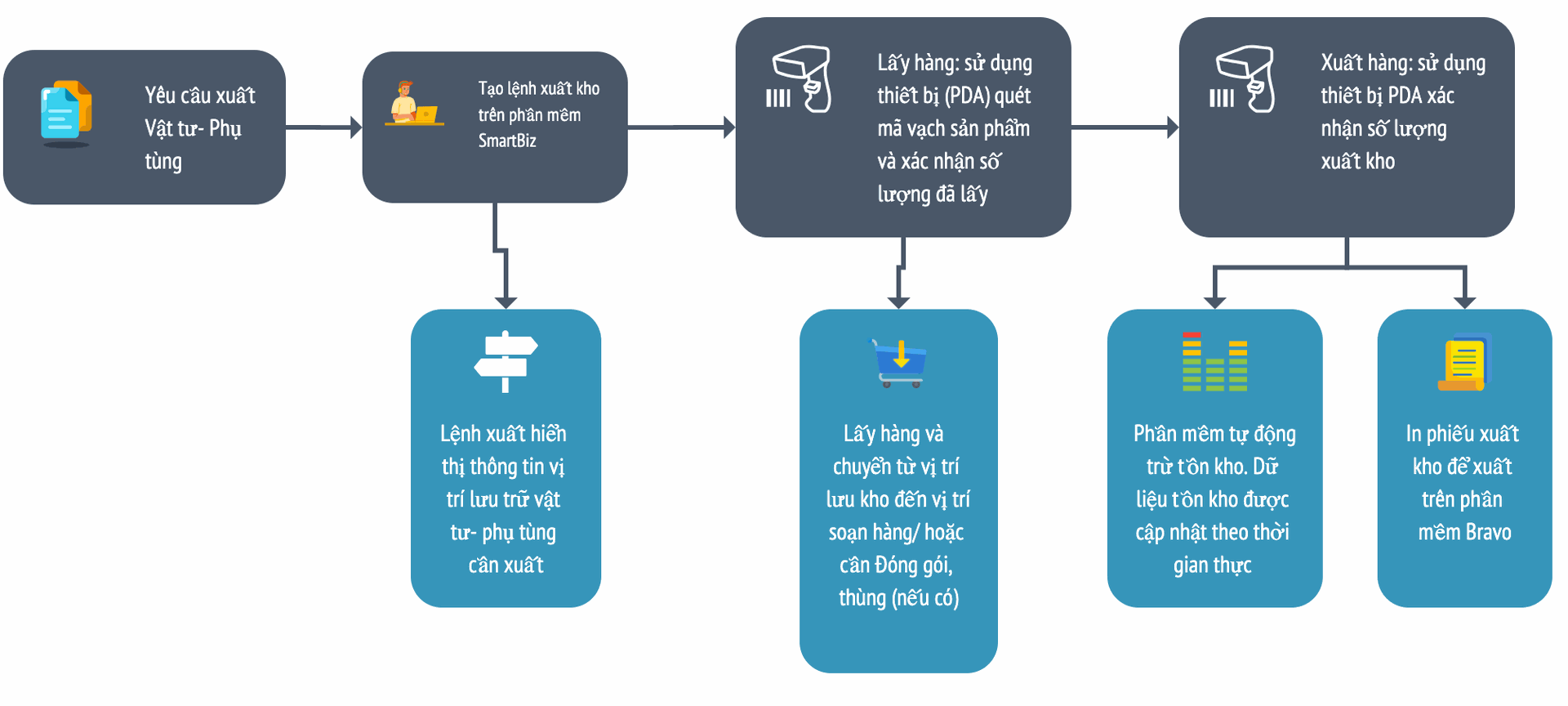
Issuing process flow for supplies and spare parts
Issuing flow description
| Item | Description |
| 1. Issue requests from user departments |
Departments send requests for goods to be issued |
| 2. Create an issue order in the smart warehouse management software |
Based on the departments' issue requests, the warehouse operator creates an issue order in the warehouse software. The system automatically suggests the storage locations of the goods to be picked. |
| 3. Picking/preparing goods |
The warehouse operator picks the goods using a barcode scanner; the PDA shows the issue slip, the items and the locations of the goods to pick. Once the full quantity has been picked, the operator confirms completion of picking on the PDA. |
| 4. Ship goods out of the warehouse |
Transfer the picked goods from the picking or packing area to the shipping area. Once confirmed, the software automatically deducts the stock. Print the goods issue note, sign it and send it to Accounting to record the issued quantity in Bravo. |
4. Goods traceability
Tracing goods in warehouse management software plays a very important role in warehouse management. It lets businesses control and accurately track the goods in the warehouse, their locations and the remaining quantities to meet customer demand.
When you need to look up or check product information, the system lets you trace by product code, lot number, serial number or carton/pallet/package number as follows:
Look up by product code:
Scanning an item code shows which location and lot the goods are in and the stock quantity
Look up by lot/serial number
Provides information on expiry date, production date, how many products the lot contains, or purchase order details… easily.
Look up by carton/pallet/package number:
When the operator scans the barcode on the carton/pallet/package, the system shows the actual, reserved and available quantities in the carton, which items it contains and where the carton or package is located, and it automatically updates the quantity or weight in the carton or package when goods are added or removed, with no recounting or recoding of the carton/package.
What makes the solution different
The differences between the proposed solution and the branch's previous way of operating:
Creating data
Product codes for new products are created in the smart warehouse management software according to the branch's rules, instead of in Bravo as before. This lets the warehouse team handle the work proactively and reduces the wait for codes from Bravo (previously, getting a product code from Bravo sometimes took 2~3 days).
Receipt and issue slips/orders are created directly in the smart warehouse software once the warehouse team has received or picked the goods and updated the quantities in the software (using barcodes and barcode scanners to receive or pick). Receipt/issue notes are printed and sent to Accounting to record the quantities in Bravo, reducing multi-step document handling, saving a great deal of time, improving accuracy and enabling receipt and issue requests for supplies and goods to be handled promptly.
Previously, when goods arrived, Purchasing would hand the documents to the warehouse and the user department to check and confirm. Then the warehouse received the goods. Complete documents went to Accounting to post the receipt in Bravo, and Purchasing took the documents back and gave them to the warehouse keeper to enter into the production management software.
Receiving/issuing goods and updating quantities in the software happen simultaneously and in real time using barcode scanners, providing fast, accurate inventory information.
How it is done
Using barcode scanners for receiving and issuing makes operations faster, raises accuracy to as much as 99% and increases the efficiency of handling receipt and issue requests by up to 50%.
Tracking goods' locations accurately makes searching fast and saves time.
Customer feedback
The smart barcode-based warehouse management solution is a major change to the branch's processes and way of operating. It was highly rated by the branch director and the warehouse team, increasing confidence in and confirming the effectiveness of the solution. It has even been proposed for rollout across the whole group.
This confidence comes from the clear benefits the solution brings. Applying barcode technology to warehouse management has increased efficiency and saved time for the customer. Inventory management processes are automated, from tracking and counting goods to processing orders and managing receipts and issues. Thanks to barcodes and location management with the warehouse layout, these activities are fast and accurate, reducing errors and increasing accuracy.
Khám phá: How to use barcodes and QR codes for smart warehouse management
[Case study #2] Smart warehouse management with production management software and Akabot software
Next is the case study of one of the world's leading manufacturers of women's lingerie. The company's production management system works well and is applied uniformly across the group, but smart warehouse management was a major challenge. The company needed to find a creative solution to meet its smart warehouse management requirements while still using its existing production management software.
This is an interesting case study of an integration solution drawn from their real operations. You will see the elegance and effectiveness of how they optimized production processes and smart inventory control, and learn how to take advantage of software integration to achieve maximum efficiency and sustainable growth.
About the company
W***A VIETNAM CO., LTD belongs to the W***A group headquartered in Japan. Founded about 50 years ago, the group is one of the world's leading manufacturers of women's lingerie. It has expanded globally by establishing branches and subsidiaries everywhere: in Asia such as Taiwan, Hong Kong and China; in Southeast Asia such as Vietnam, Singapore and Malaysia; in Europe such as the UK, France, Germany and Italy; and in the Americas such as the US and Canada.
Current state of warehouse management
The company currently uses the parent company's MES production management and finished goods management software from Japan, and Akabot software to automate repetitive, cyclical manual tasks.
Warehouse operations such as receiving/issuing/transferring/counting goods are done manually. Figures are written on paper, then entered into Excel files for management and then into the company's production and finished goods management software as input data for production.
The company's goods are mainly fabric materials, packed in rolls or on pallets. Fabric rolls are managed by lot when received into the warehouse, and each roll has a different, uneven length in meters.
Fabric materials are shipped by the Japanese parent company and received into the warehouse for production. The warehouse team then manages the materials and issues them to production when production requests them.
Fabric rolls are not yet managed with barcodes.
Customer requirements
Fabric materials in the warehouse must be managed with barcodes or QR codes, and racks and bins must have barcodes to manage locations.
Warehouse operations such as issuing/receiving/transferring/counting are carried out with barcode scanners to reduce user data entry and ensure data accuracy.
Make it easy to search for and retrieve materials in the warehouse at their exact storage location, or when looking for materials to issue to the production stage.
Effective, accurate inventory management: when issuing to production, the system must report the remaining fabric quantity.
Automatically update material issue order data from the new warehouse management software into the MES production management software to execute manufacturing orders.
The solution: raw materials warehouse management
To solve the current problems and meet the business's requirements, a smart warehouse management solution integrated with the MES was proposed, including:
- Barcode-based warehouse management, with receiving, issuing, transfers and counts done on mobile devices and barcode scanners. This replaces inaccurate, time-consuming paper and Excel files, updating inventory data in real time and raising inventory accuracy and availability to as much as 99%.
- Quickly track in full detail the number of fabric rolls issued and waiting to be cut, how much has been cut, and the surplus or shortfall on each roll by managing rolls by lot and fabric package number. This enables accurate inventory management, quality and performance control, and the ability to meet order requirements.
- Easily look up and trace goods at any point, from receipt into the warehouse and transfers to areas and locations to issue to production and delivery to customers, by lot and by fabric roll. This helps them manage inventory effectively and ensures counting, checking and reuse of goods are done accurately and quickly.
- Modeling the business's warehouse layout with its zones, aisle locations and the status of goods and materials. Information on products/semi-finished goods, how full each location and site is (%), which spaces are empty and which are overloaded… is displayed visually on screen.
- Automatic alerts and smart reports in real time help warehouse managers reduce risk, get timely information and make decisions quickly.
- Integrating the MES production management software with the smart warehouse management software to automatically update material issue data according to the manufacturing orders created in the MES. This completely eliminates manual recording and data entry, saving time and reducing errors. The integration also improves accuracy and synchronizes data instantly between the two systems, optimizing production material and warehouse management and creating a flexible, smart working environment.
Below is the receiving diagram, designed with 2 roles:
The warehouse coordinator and the warehouse staff. These roles are separated by specific tasks and can be split or combined depending on the size of the warehouse and the available staff.
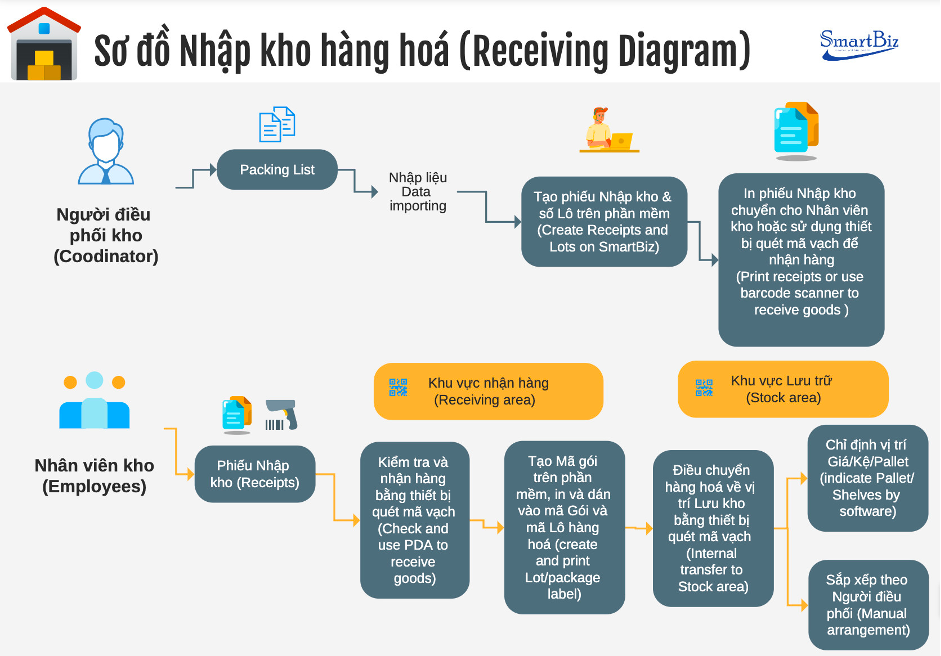
Raw materials receiving diagram
Warehouse coordinator: based on the packing list, creates a goods receipt in the software and creates lot numbers for the incoming materials. They then print the receipt from the software for the warehouse staff to receive the goods, or the staff use a barcode scanner (PDA) directly to open the receipt order and receive the materials.
Warehouse staff: with the receipt in hand, use the PDA to receive the goods. During receiving, staff use the PDA to create package codes for the fabric rolls. The printer connected to the software prints the package codes automatically, and staff stick them on the fabric rolls being received.
After sticking on the package codes, staff transfer the goods to storage locations. Transfers are done using the following methods:
· Designated storage locations (racks, shelves, pallets)
· Arrangement as instructed by the warehouse coordinator.
Next is the raw materials issuing diagram

Warehouse coordinator: when materials need to be issued to production, the coordinator creates a material transfer/issue order in the software. They then print the slip for warehouse staff to pick the materials, or the staff use the PDA directly to open the transfer order and issue the materials.
Warehouse staff: use the PDA to pick goods at storage locations by scanning the package code on each fabric roll and confirming the transfer to the QC (fabric spreading) location. Likewise, after QC, staff use the PDA to transfer the fabric rolls to the “staging for cutting” area for cutting.
Issue-to-cutting diagram:
Quickly track in full detail the number of fabric rolls issued and waiting to be cut, how much has been cut, and the surplus or shortfall on each roll by managing rolls by lot and fabric package number. This enables accurate inventory management, quality and performance control, and the ability to meet order requirements.
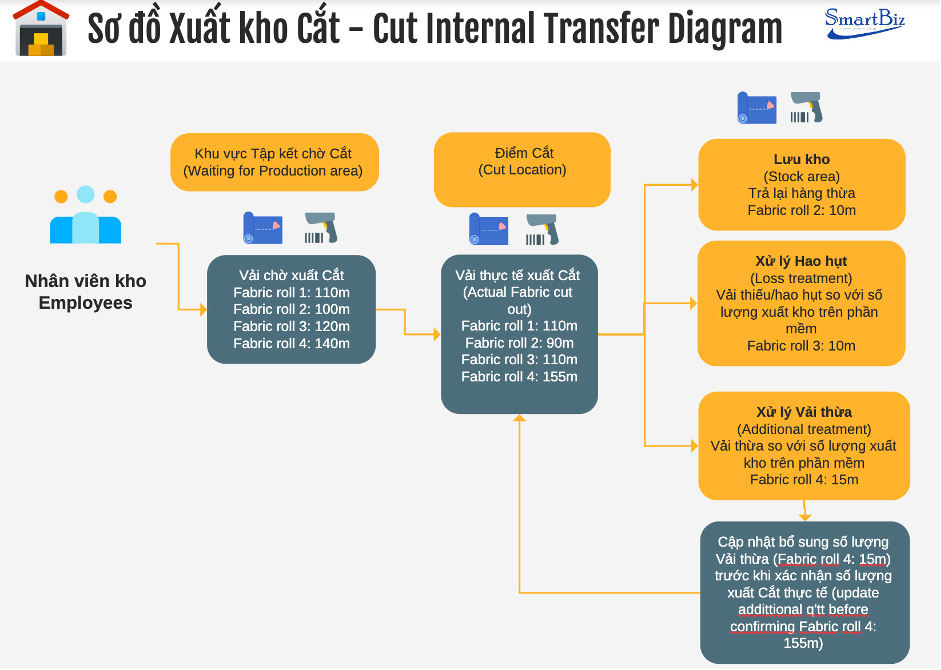
Diagram of issuing fabric for production cutting
Warehouse staff
Use the PDA to transfer fabric from the “staging for cutting” area to the “cutting” area. Scan the package code on each roll to issue exactly the meters needed for cutting.
After cutting, a fabric roll may be fully used, have a surplus or have a shortfall
- For rolls with a surplus, the remaining meters are recorded and the roll is returned to the warehouse.
- For shortfalls, when rolls issued for cutting don't match their original length, the actual meters must be updated and recorded before confirming the cut meters in the software.
- Where the fabric exceeds the cutting stage's requirement, the actual meters on the roll must be updated before confirming the actual cut meters.
- Staff carry out all of the above on the PDA.
After confirming the meters of fabric issued to production for cutting, staff confirm the issue order in the smart warehouse management software. The fabric issue data is automatically updated in the MES, which is integrated with the warehouse management software, for each manufacturing order, and becomes the input for subsequent production and production management.
Customer feedback
The company's production director in Vietnam and its Japanese production management rated the solution as meeting their requirements exactly. Even better, the company went on to request phase 2 of the project: materials and trims warehouse management.
The request for phase 2 shows the company's trust in and satisfaction with the solution. It proves that the project not only met the initial specific requirements well but also achieved a significant level of success, enough to be expanded to a wider scope of warehouse management.
Khám phát: The TOP best warehouse management software in the world
Here are the key benefits the solution delivers:
1. No disruption to operations: linking the smart warehouse management software with the production management system lets the business keep using both systems without disruption. This ensures production and warehouse management continue smoothly, without affecting efficiency or productivity.
2. Flexible change management: lets managers and staff easily adapt to system changes and align with the group's system while still meeting the Vietnamese company's smart warehouse management requirements.
3. Optimized efficiency and productivity: increases efficiency and productivity in production and warehouse management. Optimizing production processes and controlling inventory reduce waste, maximize resource use and improve the ability to meet market demand.
4. Greater consistency and synchronization: creates consistency and synchronization in data and information. Production, inventory and transaction data flow seamlessly and accurately between the two systems, ensuring data accuracy and reliability. This gives managers and staff complete, correct information for business decisions and planning.
5. Cost and time: linking the smart warehouse management software with the existing production management system usually requires fewer financial resources and can be deployed quickly. System integration can therefore be a more economical option than replacing the entire system.
[Case study #3] Smart warehouse management with ERP software
As one of the large businesses pioneering the use of technology to manage and run its operations, the company has used ERP software from Korea's Ksystem, applied uniformly from the parent company to the Vietnamese company, for more than 10 years. However, its warehouse and production modules now have many shortcomings and no longer fit current management requirements.
Want to learn about the optimal solution for this business and case study #3? We have a separate article about this company's case. Read it now at: Businesses struggle with integrating ERP systems for warehouse management